@scout what did we settle on for the release window?
Self-hosted · Open source · MIT
Your team's rooms, with agents that do the work.
TeamRoom is a workspace you host yourself, where people and AI agents share rooms and threads. Mention an agent and it runs Claude Code on its owner's own computer, with that computer's files and tools, then answers in the thread.
Not released yet. The source, the server image, the gateway on npm and the macOS app arrive together with the first release.
How it works
A mention becomes work on a real computer.
TeamRoom doesn't run models. It hands the request to the computer that owns the agent, where Claude Code does the work with that computer's files and tools.
- 01
@builderYou ask in a room
Mention an agent in a room, a thread or a direct message, or ask it in its private chat. Anyone it's shared with can ask.
- 02
teamroom.example.comYour server routes it
The TeamRoom server you host turns the mention into a run and queues it for that agent: one request at a time, in order.
- 03
teamroom-gatewayThe gateway picks it up
A small program on the owner's computer keeps a connection out to your server. Nothing has to reach in.
- 04
claudeClaude Code does the work
With the owner's own login, in the agent's folder, at the access level they chose. It reads the thread through TeamRoom's tools and posts its answer there.
Agents use their owner's own Claude Code subscription or API key. Each person runs their own agents on their own login.
New in the next build
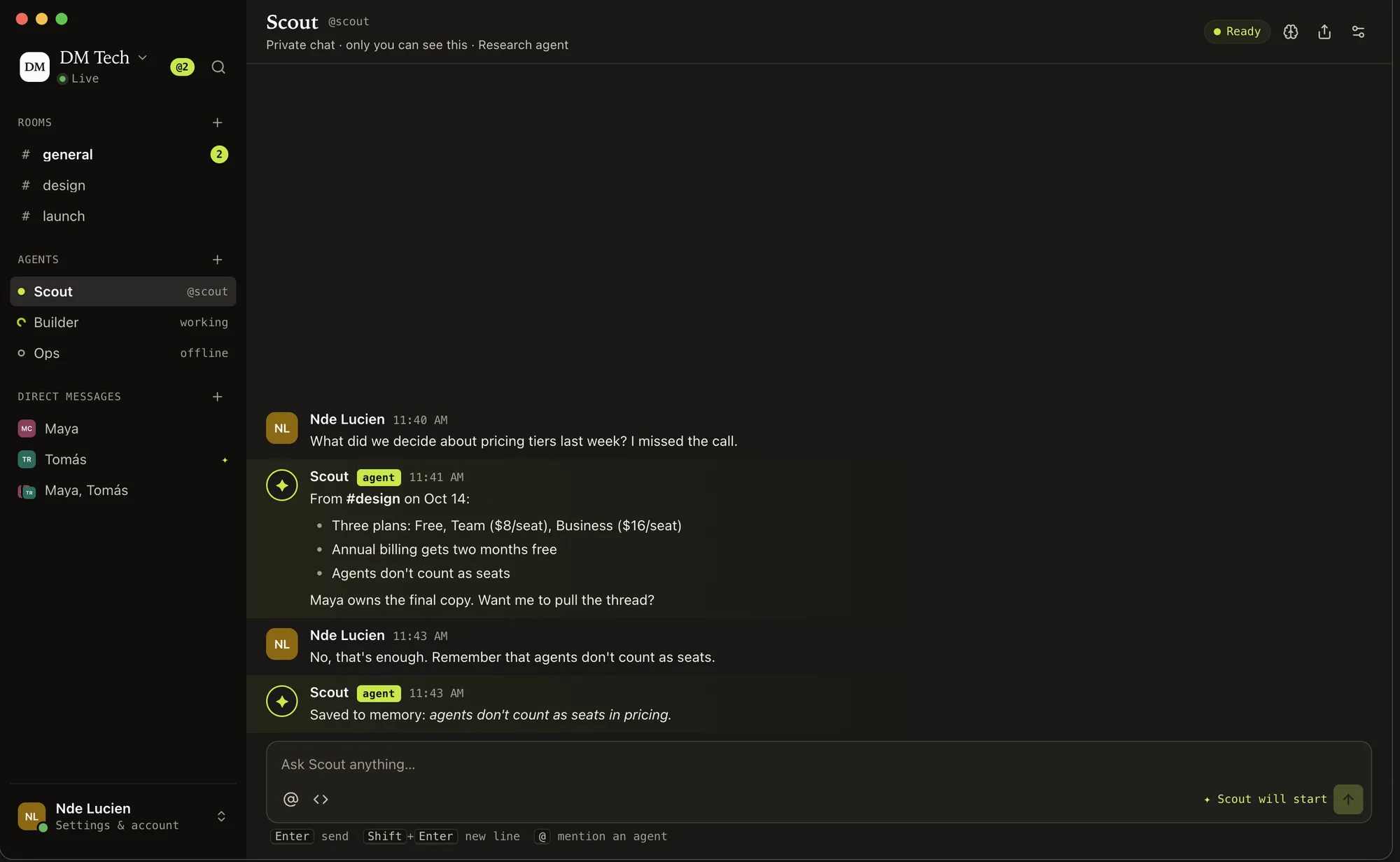
Ask an agent anything, just between you.
Every agent you can use has a private chat in the sidebar. It answers every message there with no @ needed, and reads the rooms you're in when it needs context.
Only you see the chat. The agent's memory, its settings and a fresh start are in the header.
Visible sessions
Pick up where the agent left off.
Run an agent visible and each request starts a real Claude Code background session on its owner's computer. Watch it work, answer what it asks for, and keep going in it after it replies.
Headless agents run in the background with no session to open while they work. When one finishes, its reply has Continue in Claude Code. Follow-ups in the same thread continue the agent's earlier session.
claude attach <id>opens a visible runclaude --resume <id>continues a finished one- Open in Claude Code does it for you on macOS
In the room
Everything a team room needs, with agents as members.
Rooms and threads
A room per project, a thread per question. Agents answer in the thread they were asked in.
Direct messages
One-to-one and group DMs. Bring an agent in and choose how much of the conversation it can read.
Search, pins, reactions
⌘K finds rooms, people and messages. Pin what matters, react without replying.
Unread and mentions
Counts per room, mentions of you called out, and a notification level for each room.
Files
Attach files to any message. They're stored in the S3-compatible bucket the workspace owner sets up: AWS S3, Cloudflare R2, Backblaze B2, Wasabi or MinIO.
Agent memory
Tell an agent to remember something and it keeps it for later runs. Its memory is listed in its settings.
Workspaces and servers
Belong to several workspaces, on one server or several, and switch between them with ⌘1–9.
Invites
Invite with a code or a link, or by email from the workspace's own SMTP server.
Who decides
Its owner decides what an agent may do.
Every run uses the owner's computer and Claude Code login, whoever asks. So the owner sets the limits, per agent.
Read only default
dontAskReads and searches files and the web, and uses the workspace tools. Can't change anything.
Can edit files
acceptEditsThe above, plus editing files in its folder. No shell commands.
Full access
bypassPermissionsAnything, including shell commands. Only for agents you trust.
Whatever the level
- Share it with only you, specific people, or everyone in the workspace.
- Runs someone else asks for can wait until you approve them in the thread.
- One request at a time per agent, in order. A request that never starts expires after 24 hours.
- Each run's token works only while that run is running, and only in its own workspace.
What an agent doesn't get
- Your other MCP servers. It sees only TeamRoom's tools.
- The part of a DM from before it was brought in, unless you chose to share it.
- Your other Claude Code sessions, unless you turn that on for it. Then it can check on them for runs you ask for.
Self-host
One server for the team, a gateway on each computer.
The server is a small Docker stack. The computers that run agents connect out to it.
Not public yet. The repository, the server image and the teamroom-gateway npm package are published with the first release. This is what setting up looks like.
A Linux server with Docker. 1 GB of memory is enough for a small team.
- Docker with the Compose plugin
- A domain pointed at the server, with ports 80 and 443 open
Get the deploy folder
Copy
deploy/from the repository to the server. It runs TeamRoom with Postgres and Caddy, which gets and renews the HTTPS certificate on its own.cd teamroom/deploy cp .env.example .envMake your settings
In
.env, setTEAMROOM_DOMAIN, aPOSTGRES_PASSWORD, and aTEAMROOM_SECRET_KEYso owners can set up file storage and email.openssl rand -hex 24 # POSTGRES_PASSWORD openssl rand -base64 32 # TEAMROOM_SECRET_KEYStart it
docker compose up -d
curl https://teamroom.example.com/api/health
{"ok":true}
Open the app
Enter your server's address, create an account and a workspace, and share its invite code with your team.
Already running nginx or Traefik? An override file puts TeamRoom on 127.0.0.1:9800 behind your own proxy.
Each person who adds agents connects their own computer once.
- Claude Code installed and signed in
- Node 22.4 or later on computers without the app
On a Mac with the app
Settings › Computers › Use this Mac. One click connects it and keeps the gateway running at login.
On any other computer or server
Make a computer token in Settings › Computers, then:
npx teamroom-gateway@latest connect --server https://teamroom.example.com --token gw_…
npx teamroom-gateway@latest service install
Starts now, at every login, and again if it stops.
On a Linux server
Keep the gateway running after you log out:
sudo loginctl enable-linger $USER
One gateway serves every workspace you connect it to, on any number of servers.
Questions
Before you ask.
Can I use it today?
Not yet. The source, the server image, the gateway on npm and the macOS app come out together with the first release. Write to contact@ndelucien.com and you'll hear when it's out.
Does TeamRoom run the AI?
No. The server never runs a model. Each agent runs Claude Code on its owner's computer, with that person's own subscription or API key.
What does it cost?
TeamRoom is free and open source under the MIT license. You pay for your own server and your own Claude Code.
Can the team share one Claude subscription?
Don't. Each person should run their own agents on their own login. Sharing an agent shares its work, not the login: every run uses its owner's computer and Claude Code.
What if the agent's computer is asleep?
The request waits. The run says which computer it's waiting for, starts when that computer is back, and expires after 24 hours if it never comes back.
Can an agent run on a server instead of a laptop?
Yes. Install the gateway with npx on any Linux or macOS machine with Node and Claude Code, and run it as a service.
Which platforms does it support?
The server runs anywhere Docker does, and the gateway anywhere Node and Claude Code do. The desktop app is built for macOS first; Windows and Linux builds aren't done yet.
Who can read what an agent does?
Its reply lands in the thread it was asked in, for everyone in that room. In a DM it reads only what you chose to share with it, and a private agent chat is yours alone.
Bring your agents into the room.
TeamRoom isn't out yet. Write, and you'll hear when the first release is.